





As temperatures soar, finding the right fan becomes a priority. But navigating the sea of big-name brands and niche specialists isn't easy. That’s where TechRadar comes in.
Our team has rigorously tested the latest models—evaluating everything from air circulation and smart features to how well a bedside fan performs on a sultry night, and whether cordless portables can truly match wired alternatives.
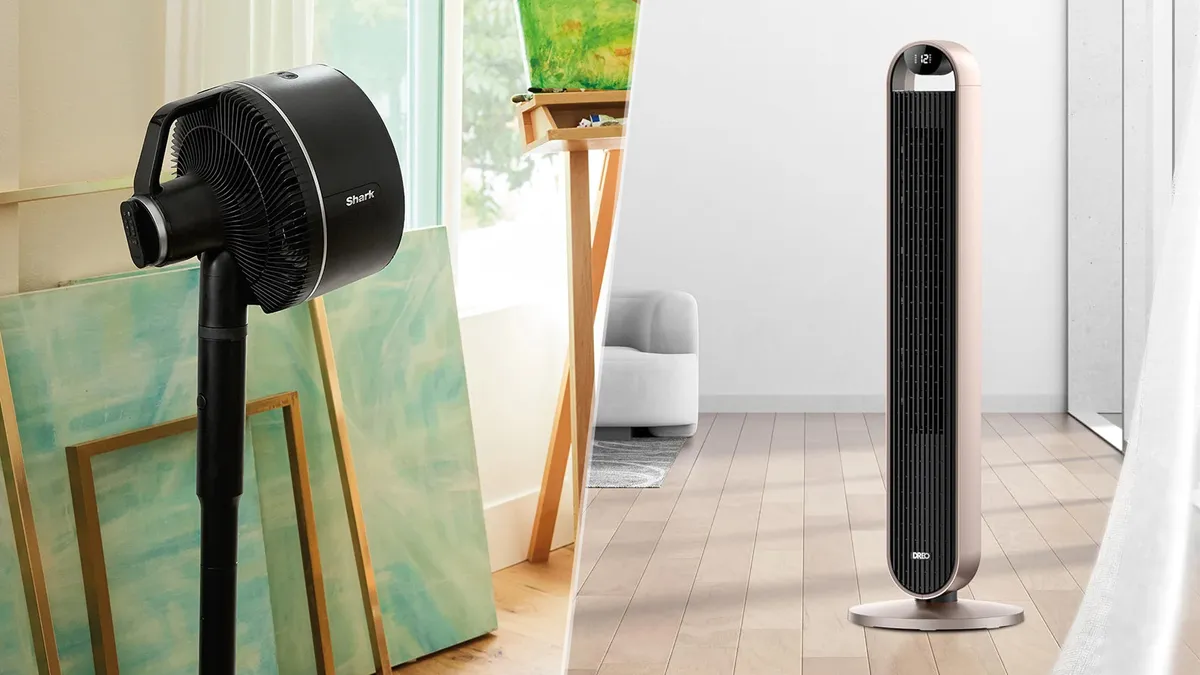
Right now, our top pick for most people is the incredibly versatile Shark FlexBreeze. It seamlessly transitions between a pedestal and a tabletop setup, works indoors or out, runs corded or cordless, and even features a clever misting attachment.

Read on for our definitive guide to the best fans for every budget. (And if you're already thinking ahead to the colder months, don't miss our roundup of the best smart thermostats.)
The best fans: tried and tested
Why you can trust TechRadar We spend hours testing every product or service we review, so you can be sure you're buying the best. Find out more about how we test.
The best fan for most people
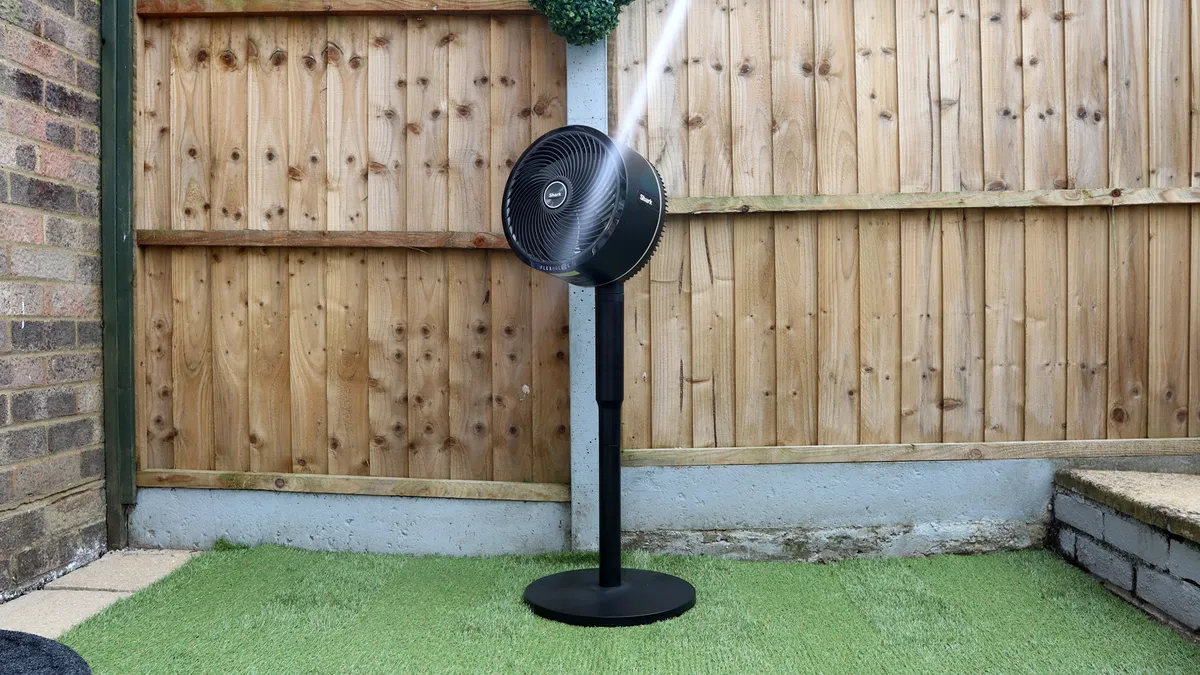


The best fan we've tested overall is the Shark FlexBreeze. It's ultra-versatile – it can be used corded or cordless, indoors or outside, and converts from pedestal to desktop as needed. But probably our favorite thing about it is its ingenious mister attachment, which envelopes you in a cooling haze when hooked up to an outdoor water source. Because it's rain- and UV-resistant, there's no need to worry about it getting ruined under a hot sun or a sudden downpour.
If you're using it cordlessly, the battery life is solid – Shark promises 24 hours on the lowest mode, although more powerful airflow will naturally drain it more quickly. It'll oscillate to 180 degrees and can also be tilted up to 55 degrees (you'll need to do that bit manually, though.)
What's more our reviewer Reece Bithrey found the FlexBreeze to be "virtually silent" on its lowest setting too, and worked a treat in a as a fan to keep him cool at night. "If you're a light sleeper this isn't a fan that's going to disturb your slumber," he said. "I had the fan on its pedestal level with my mattress, and its airflow wafted over me on the lowest setting, helping to cool both me and the room around me impeccably."
Compared to other options in this list, it's a little lacking in advanced features. There's no app control or timer option, and no special modes other than 'Boost', which is essentially just an extra speed. However, if you're happy to keep things (relatively) simple, this is still a seriously cool customer. In fact, our tester was impressed enough to buy not one, but two Shark FlexBreeze fans for his home.
If you're only going to use it out and about, it also has a portable sibling, which you'll find in our list at #10.
Read our full Shark FlexBreeze fan review
The best tower fan


The Dreo Smart Tower Fan 519S is the best tower fan we've tried. It delivers powerful cooling and a wide range of useful features, for a great-value and relatively affordable price.
There are nine standard airflow speeds, the upper levels of which could easily cool a couple of connected rooms in one go. "Most of the time, I didn't need to go beyond 6, but some days my house grew particularly warm, and I appreciated the higher speed levels," reviewer Alex Temblador noted. "When placed on the first speed level, I could feel the air blowing on my skin about 19.5 feet away. On the highest speed level, I could feel cool air at 29 feet away. With this in mind, you don't have to be in the same room as the fan to enjoy cool air from it."
However, it was the speciality modes that Temblador was most enamored with. In Auto mode, the fan intelligently adjusts to maintain a constant ambient temperature, while in Sleep mode, the fan will slowly decrease fan speed as you doze off. There's also a Natural breeze mode, which mimics the great outdoors. It's just a shame the oscillation field is relatively narrow, at just 90 degrees (our premium pick from Dyson at #8 rotates a full 350 degrees).
Because it's a smart fan, it comes with a companion app that unlocks a range of useful extra features, including the ability to turn on the fan while you're out – so you can return to a cool house – and to schedule the hours it comes on.
Price-wise it's not the cheapest but it's also far from the most expensive option on the market, and we think it delivers excellent value for money. If you're seeking a more affordable option, head to #7 to check out the Govee, which is similar and slightly cheaper. Or, if a tower fan isn't for you, you'll find our favorite pedestal fan at #1.
Read our full Dreo Smart Tower Fan 519S review
The best fan for sleep


The Cool CF1 is the 2025 version of Dyson's original bladeless fan, and it's perfect for use overnight. Our noise-sensitive reviewer found that no matter which of the 10 fan speeds she used, it was incredibly quiet yet impressively powerful.
There's a dedicated Sleep mode, which dims the display and lowers the windspeed to level 4. You can also choose from three ranges of horizontal oscillation – 15, 40 or 70 degrees – and the fan part can be tilted vertically too. That means it can be pointed directly at a single person, or sweep across a full bed if you prefer. While it sounds a little unusual while oscillating, our tester still had no trouble sleeping with it running nearby in this mode. Finally, a timer option (which runs from 30 minutes to eight hours) means you can set it up before you turn in for the night, and it can run as long as you'll need it to to drop off.
The bladeless design whips up a smooth, powerful flow of air, seemingly from nowhere, with our reviewer observing: "While this was great for keeping my makeup from melting off my face, it proved a bit of a sensory nightmare for me, so I made good use of the oscillation."
Parents of small children won't have to worry about little fingers getting stuck, and while the sleek surface can attract dust, it's still easier to keep clean than your standard tower or bladed pedestal fan, with all their various nooks and crannies.
The sticking point for many will be the price. There's no getting past the fact that other brands offer more features for a much lower cost – there's no no companion app, nor an Auto mode or any smart features here. If you're looking for maximum bang for buck, this probably isn't the fan for you. However, where it does stand out is in the quality of build and engineering, as well as the sleek design. At time of updating this guide, it's only available in the UK – it's due to arrive in Australia some time this year, but not until 2026 in the US.
Read our full Dyson Cool CF1 review
The best air circulator fan


The best air circulator fan we've tested is the MeacoFan 1056P. What is an air circulator? Essentially, while a traditional fan blasts air at something, a circulator is designed to move air around to create an even temperature in the whole room. It's especially effective when placed next to a cool air source, like an air con unit or a bowl of cold water. The real beauty is that this model can also be used like a traditional fan, so you're getting the best of both worlds.
This floor-standing circulator sits on a sturdy base, blasts out a powerful flow of air and oscillates both horizontally and vertically. Combine this with 12 speed settings and it's no surprise our tester found this circulator fan a life-saver during a heatwave. It's quiet enough that he could also sleep with it on in his bedroom. There's no companion app, but the remote control makes it simple to adjust settings without having to get up. Cleverly, this attaches to the front of the fan magnetically, making it harder to lose.
It's less versatile than the Shark FlexBreeze at #1 – there's no cordless option, it can't be used outside and you won't get a mister – but it's also cheaper. For indoor use, it might actually be superior in terms of cooling powers, too. If you don't want something floor-standing, it's available as a desktop model: the MeacoFan 1056 (no 'P').
In terms of styling, our revier noted: "While the MeacoFan 1056P may look a little bit plain when standing next to a snazzy Dyson, there is an understated traditional charm to it, with some nice modern touches."
And the fact it has blades might put some people off. While the front grille provides protection, the gaps are large enough for little fingers to poke through – something to consider if you have small children. Otherwise, this is an impressive air circulator fan that you’ll be pleased to have around, especially during the summer.
Read our full Meaco MeacoFan 1056P review
The best fan for cooling big spaces


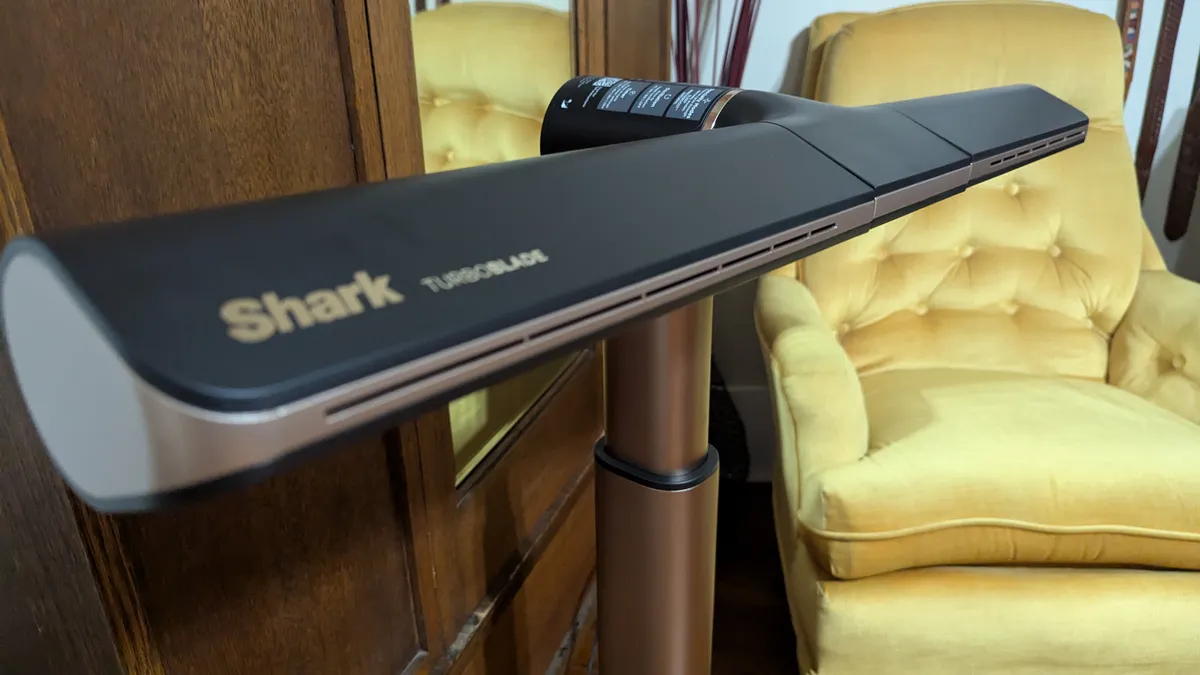

The Shark TurboBlade doesn't look like any other fan we've tested at TechRadar. Rather than a tall oval, it has windmill-like arms that can be rotated to horizontal, vertical or anything in-between, with blades of air blasting out from vents in the arms that can also be angled – perhaps into two different rooms at once. The whole setup is mounted on a telescopic tube, which means it can be adjusted in height, too. In short, you can set this fan up to push air in any direction for complete cooling coverage.
On test, our reviewer Alex Temblador found the TurboBlade could cool a room in ultra-quick time, and the 10 fan speeds plus a timer option, remote control and 180-degree oscillation airflow deliver a decent amount of control. "Most of the time, I set it at 3 as I found this level quite sufficient in circulating the air and blowing a cool breeze on me," said Temblador.
The TurboBlade particularly impresses with its speciality modes, in particular the Natural Breeze Mode that delivers gently fluctuating airflow that feels like you're outside in the fresh air.
You're paying a bit of a premium for the unique form factor – at this price we'd expect smart controls via a companion app (as per various other options in this guide). However, Shark is no stranger to sales and we expect to see some decent discounts appearing before too long. If you're cooling a big space, it's also worth considering an air circulator, such as the Meaco options at #2 and #4.
Read our full Shark TurboBlade review
The best mid-range fan


Replacing the Sefte 8in on this list, the MeacoFan Sefte Pro 10in makes for an excellent mid-range fan and one that'll fit nearly on your desk or small space, yet still powerfully circulate air, all while being surprisingly quiet.
"Meaco really shouts about the fan's "whisper-quiet" performance. I was ready to dispute that a bit, but wow it is surprisingly quiet, even when you bump up the intensity," reviewer Becca Caddy highlighted. "I used a decibel measuring app and found setting 1 came in at around 30dB. Setting 6 was around 40dB with setting 12 only hitting 55dB. For context, my high-tech kettle just before it finishes boiling is 69dB and my hairdryer is 78dB. So you are getting a quiet performance here, especially for a powerful fan."
This means the MeacoFan Sefte Pro 10in not only circulates air well, but is quiet enough to have on throughout the night while you sleep, which is exactly what Caddy founder herself doing with the fan.
When you want to adjust the fan there's a range of options, from buttons and touch controls on the fan, to a near circular remote. But Wi-Fi connectivity mean you can also control the fan with an app, which can be handy when setting the fan's timer function. And there's also third-party voice control on offer via the Google Assistant or Amazon Alexa.
This combination of features and performance means the MeacoFan Sefte Pro 10in Table Air Circulator is an easy recommendation from us and an excellent mid-range addition to our best fans list.
Unfortunately, this model is not yet available in the US – stateside shoppers should check out the similarly excellent Meaco 1056 instead. It's the tabletop version of the floor-standing 1056P at #5, and you'll find buying options below.
Read our full MeacoFan Sefte Pro 10in review
Another excellent smart tower fan


The Govee Smart Tower Fan is a similar proposition to the Dreo model at #3, but can sometimes be found for slightly cheaper. Like that model, it can be controlled in various ways – via a touchscreen panel on the front of the machine itself, using a remote control, or on the companion app. You can also connect it to your Alexa or Google Assistant for voice control, although our reviewer found this method could be frustratingly temperamental.
But the app does give you access to a range of features, such the ability to create your own personalized setting, set a timer, create a schedule, and enable Auto mode.
Feature-wise, the Govee Smart Tower Fan is a winner for its price. It has eight speed settings as well as specific modes, including a Nature mode that constantly adjusts the rhythm of the airflow so that it feels more like a breeze than the blast of air from a fan.
Our reviewer Victoria Woollaston particularly liked this node, notably when sleeping: "During my testing, I found the Nature mode to be a welcome touch, mimicking a more natural airflow. Especially at night when it felt like a light breeze. I preferred this Nature mode over the more gentle, quiet Sleep mode."
The Govee Smart Tower Fan's unobtrusive design means that you can stick it in a corner and forget about it, and it'll easily cover medium-sized rooms thanks to its 26-foot air range and 75-degree oscillation. It's not too noisy, either, with an average 38dB noise level that comes down to 34dB in Sleep mode. There's even the option to hook it up to a Govee thermo-hygrometer (sold separately) so that it'll automatically adjust its fan speed based on your room's temperature and humidity.
When we tested this fan, our reviewer found it the base wasn't very stable and it could easily be knocked over by children or pets. However, since then it's had an update which Govee says includes a more stable base.
Read our full Govee Smart Tower Fan review
The best multi-purpose fan


If it's the best-of-the-best you’re after, the Dyson Purifier Hot+Cool Formaldehyde HP09 is it. This is a three-in-one fan, air purifier and heater, and it does all three to the highest standard. Switch on Auto mode and it'll cool or heat your space to your preferred temperature, as well as taking care of any allergens or pollutants in the air.
Because this is a fan guide, let's start with the cooling. Dyson is very, very good at making air move quickly, and this appliance uses the brand's 'Air Multiplier' technology to deliver powerful cooling airflow. There's 10 speed options plus Auto and Night modes alongside an Auto mode, it's surprisingly quiet in use, and it can oscillate a full 360 degrees.
It's also one of the best air purifiers we've tested, an is able to tackle a wide range of pollutants including the carcinogenic formaldehyde. Air purifiers are useful for many people, but here it's a particularly logical addition for anyone who suffers from seasonal allergies.
Our reviewer Josephine Watson really put the purifier abilities to the test: "I tried lighting incense and a candle to see how the Hot+Cool Formaldehyde handled the particulate matter. Just a meter away from the purifier, the candle and incense stick spiked the air quality from “Good” to “Very Poor” according to the Dyson app – slightly alarming – but it managed to restore healthy levels within 10 minutes of the purifier being turned on."
On top of the air purifying chops, the Dyson's heating is also excellent, and it comes with a built-in thermostat to save on running costs by ensuring it doesn't keep running when it's not needed.
The sticking point for many will be the price: it's extremely expensive. We don't think it's wildly overpriced given the wide range of features, but it'll only really be worth it if you need all three capabilities. The good news is that Dyson has a lot of equally effective fans, if you're happy to sacrifice some of the extra functionality – our Dyson fan guide runs through your options.
Read our full Dyson Purifier Hot+Cool Formaldehyde HP09 review
The best desk fan
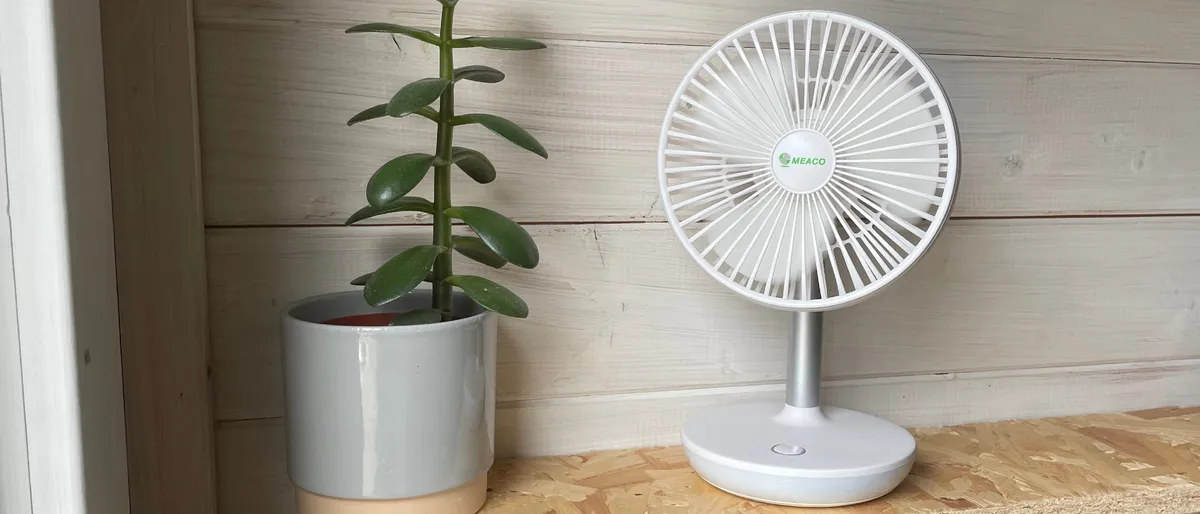
The MeacoFan 260c Cordless Air Circulator is a simple but effective desktop fan that could be a game-changer in stuffy offices. This fan can be used cordless, is lightweight so can be moved about easily and offers up to a full day (14 hours) of use on its lowest speed. Conveniently, it charges via USB, and you can use it while it's charging too.
It's simpler than most of the fans in this ranking. There are only four speeds to choose from, it doesn't oscillate at all and it's operated via button only with no remote options. However, the latter two functions there are arguably unnecessary anyway, given that it's designed to be moved around and positioned close by. But it's also much lower priced, and offers excellent value for what you're getting. (If you'd like a portable fan with more advanced features, check out the Shark HydroGo at #10.)
On test, our reviewer used it in the kitchen while cooking on a hot day, while on our Peloton bike, and even had it running sat on the table while eating dinner in the garden. And in every scenario, it made the hot weather more bearable. It's convenient not to have to move a big, heavy fan around, or think about the nearest available power outlet. It won't replace a bigger fan, but the 260c makes a great addition to your home.
Currently, the 260C is not available in the US, but the Dreo TurboPoly 312 is a good alternative – you can purchase is direct from Dreo or at Amazon. It's not cordless but it's small and light with adjustable tilt and three speed settings.
Read our full MeacoFan 260c Cordless Air Circulator review
The best portable fan


Combining it all into an eye-catching design, the Shark ChillPill is a fan, cooling plate and mister in one colorful, portable, well-built package. As a personal cooling system it offers a decent amount of air-blowing power in a small frame, albeit a little loud at higher settings, and has a cooling plate that you can put against your skin to cool off in another fashion.
There's also the msiting mode that uses a small tank of water to generate a cooling mist. "I found the mist to be fine enough that it won’t soak you or anything around you, which means you can use it indoors or on public transport if you’re mindful about it but I probably wouldn’t use it directly over electronics," said our reviewer Becca Caddy.
So there's plenty of cooling options to use, and it's solid battery life and portability means the Shark ChillPill could be idea for people travelling to a warmer climate or stuck commuting into the office on hot public transport.
For cooling large spaces or having a fan to keep on overnight while you sleep, or something you want to integrate into your smart home setup, then there are other fans on this list that'll better suit those needs. And for those on a budget, the ChillPill might be a bit pricey. But for people after a literally cool portable fan, then the Shark ChillPill is well worth a look.
Read our full Shark ChillPill review
The best smart pedestal fan
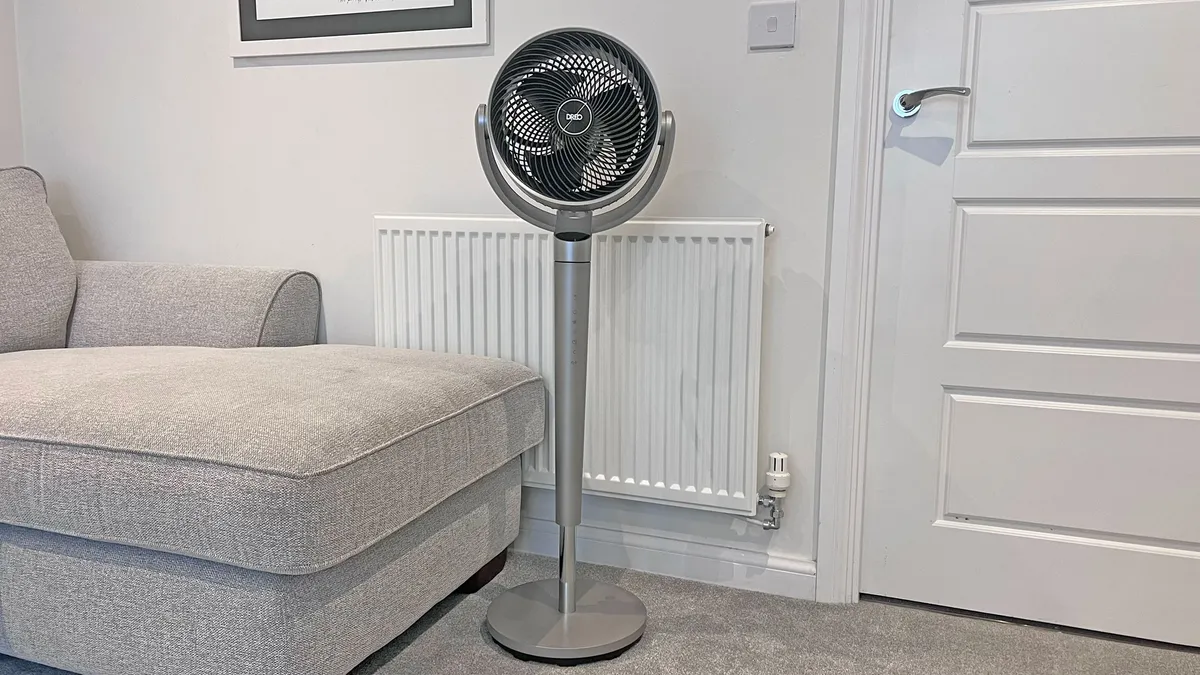
The Dreo PolyFan 704S is the best smart pedestal fan we've tested. It features nine speed settings, and even at maximum power it's surprisingly quiet. While it only has a small (9" / 22.7cm) fan head, it delivers a powerful a 110ft / 33.5m wind distance and like the Meaco option at #5 offers vertical as well as horizontal oscillation.
"Even on the lowest setting, the fan is powerful and effective. I could sit on the other side of the room and still feel the wind touching me," said reviewer Victoria Woollaston. "The air itself is cool enough to lower both my temperature, and the temperature of the wider room, without ever making me feel cold, or icy, as is common with powerful fans."
It does this without being noisy too, and with a Sleep mode, the Dreo PolyFan 704S will suit you if you need a fan to keep you cool during a warm night.
Unlike the other pedestal fans in this list, this option comes with a companion app and support for voice commands via a smart speaker. In the app you can change the fan mode, set schedules and timers as well as programming it to maintain the right ambient temperature for you. Woollaston particularly loved the voice controls and the 3D Angle Control in the app that enabled her to set the angle of the fan simply by running her finger across the screen.
It's not perfect. While the fan head itself looks elegant, the stand and base look disappointingly plastic and chunky. That said, this use of plastic reduces the fan's weight, and at 17.82lb / 8.1kg it's easy to pick up and move around. But if you're after a powerful and quiet fan with smart features at a price that won't bankrupt you, this is a great choice.
The Dreo PolyFan 704S isn't available in the UK. Check out the Shark FlexBreeze (#1) or Meaco 1056P (#5) for alternative pedestal options, or if you want a smart fan there's the Dreo 519S (#3) or Govee (#7).
Read our full Dreo PolyFan 704S smart fan review
The best retro fan

In search of a desk or countertop fan that isn’t an ugly, generic white fan? This is the model for you. The Vornado VFAN Sr. Vintage is a cool, retro-looking fan that you won’t want to hide in the corner. As well as looking great, it feels high quality and delivers powerful airflow.
The sturdy metal construction bucks the trend of flimsy plastic fans, and with a simple mechanical dial to switch between the three speed settings on offer, this fan is about a simple as they come. In use, our reviewer found the Vornado VFAN to be relatively quiet and, despite its size, it did a surprisingly good job of delivering a breeze and keeping a medium-sized room feeling cool on a stifling hot day. "This small fan isn’t just powerful in blowing air; more importantly, it’s incredibly effective at circulating air in the room – and that’s without oscillation," our reviewer said. You should, therefore, be able to sue this little fan while sleeping, but it's not the best option for that on this list.
While it doesn’t oscillate, it's designed to move air in what Vornado calls a 'vortex action', which we found effective. Plus, the 360-degree pivot allows you to angle it in any direction.
Unlike the other desktop fans in our list, it can't be used cordless, and it comes with the fewest speed settings of any fan here. And don't expect any smart options either. But the main reason to buy this fan is the retro-cool design, and on that front we haven't seen anything like it on the market.
Read our full Vornado VFAN Sr. Vintage review
How to choose the best fan
What are the best fans to cool a room?
We think the best fan right now is the Shark FlexBreeze – it's an excellent all-rounder that'll help you keep your chill even when temperatures are uncomfortably balmy.
However, strictly speaking, the answer to the question 'Can fans cool a room?' is 'no'. The vast majority of fans don't actively lower the temperature of the air, they just move it around. This helps you feel cooler, because it causes sweat on the surface of your skin to evaporate more quickly. The fan will need to be directed towards you to have an effect, and won't work as well in humid conditions.
There are fans, such as the Dyson Purifier Cool Autoreact, that will actively reduce air temperature. However, for active cooling, you'll probably need to opt for air conditioning – our fans vs air conditioners article runs through all the differences.
What kind of fan should I buy?
Broadly speaking, there are two main types of fan: pedestal fan and tower fan. The former is probably what most people picture when they think of a fan; a circular fan head with visible propellor blades. The latter is a newer style – tall and slim, with internal blades. Either can be effective at keeping you cool, and both have their pros and cons. Tower fans tend to use space more efficiently, be quieter in operation and some may prefer the more modern styling. Pedestal fans might offer more powerful airflow, and be more adjustable in terms of directing the airflow.
Which is the quietest fan?
While your main priority when shopping for the best fan are likely to be how effective it's going to be at moving air around and keeping temperatures comfortable, you're likely to lose your cool if it makes too much noise when it's doing so.
As a rule, the more powerful a fan is, the more noise it's going to make when it's doing its thing. So while a quiet fan may be less of a disturbance, it's also likely to be less effective at keeping you cool. The good news, though, is that none of these fans are unbearably loud; the loudest on our list is the Shark FlexBreeze that'll kick out 62db on its highest setting, and that's roughly equivalent to a normal conversation.
Five of our listed fans have a quietest volume of 35dB or less, and they're unlikely to cause you any disturbance at all. Of these we rate the Dyson Cool CF1 as the best fan to have on when you're sleeping, because it's quite as well as incredibly effective.
Is it safe to use a fan overnight?
In short, yes. There's no real danger of one of the best fans overheating and setting on fire in the night, as the movement of air keeps the motor cool; in fact the only real danger could be if you have a floor-standing fan that's powered by a cable that you could trip over if you get up in the night.
That said, there can be downsides to sleeping with a fan on. According to sleep experts at Amerisleep, these include triggering allergies by circulating dust, pollen and other allergens, causing congestion by drying out your nose and throat, drying out your eyes and skin and even aggravating muscle aches.
However even if any of these negative effects are the case for you, you can minimize them and still enjoy the benefits of sleeping with a fan on, by investing in an oscillating fan that doesn't blast you with a constant stream of air in one direction, setting a timer so that your fan turns off after an hour or two, and by keeping your fan set up at a distance with you so that you can enjoy the movement of air without being in the path of a concentrated airflow.
How we test fans
We've kept our cool when reviewing the fans for this guide. Each one has been used in our reviewers' homes during some hot spells throughout the year(s), proving their worth.
Our reviewers will test the fans on each of their speed settings, test out any special modes, as well as test out the range of control options available for the fans, whether they simply offer buttons and a remote, through to app and voice control.
And to test the power of a fan, our reviewers will, where practical, plug a fan in at one end of their home or testing space and then back up and see how far away they can get while still feeling an airflow. This will be repeated for highest and lowest settings.
The fans we've reviewed include floor fans, desk fans, cordless fans, pedestal fans and a cooler / air purifier option. Each one has been called in to cater for the different cooling requirements in our homes. For example: those who work from home frequently will be looking for a desk fan, while those who want the power but have limited floor space may prefer a pedestal fan or a tower fan.

When we're testing we take into account the price and availability, design and performance. We measure the noise levels and the effectiveness of each of a fan's settings (if there is more than one setting).
We like to test each product for a minimum of two weeks before either returning the model, or hanging on to it to test over a longer period.
- You've reached the end of the page. Jump back to the top ^
