


A 75-inch TV is a great choice if you’re looking for a big screen to pull your home theater experience together. They’re not as expensive as they once were, either, which is good news for anyone looking to upgrade from one of the best 65-inch TVs. However, there are a lot of models to choose from, and technical specs don’t always paint a clear picture of how the TV will suit you.
The TechRadar team has tested all of the TVs in this guide, directly comparing them to their biggest rivals in real-world evaluations, ensuring that movie fans get the best color accuracy and contrast on a big screen, and that there’s a good refresh rate for gaming and sports.
Below, you’ll find our top 6 picks, covering different use cases and budgets, ranging from today’s best OLED TVs at premium prices to affordable big-screens that still pack plenty of bang for your buck. Currently, we think that the LG G6 is the best 75-inch TV you can buy, thanks to its awesome overall brightness and anti-glare screen.
October 12, 2026
Added 'How to choose' buying advice, and overhauled FAQs.
The best 75-inch TV overall

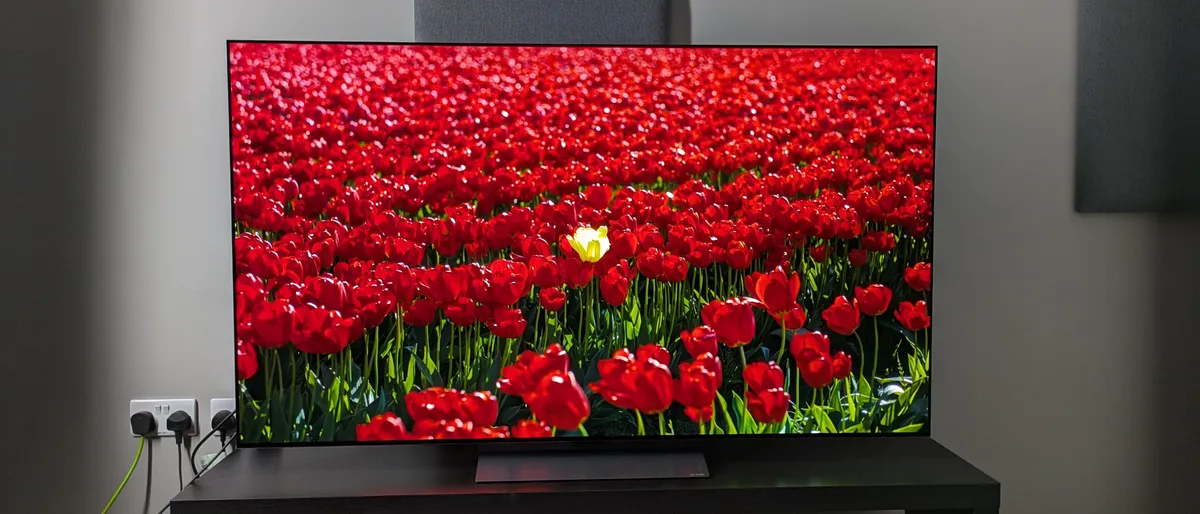


✅ You want great picture quality: The C5's picture is crisp, colourful, and delivers strong contrast. There aren't many better options in this price range.
✅ You're a gamer: With 4K 144Hz and Dolby Vision gaming support on all four HDMI ports, the C5 is stuffed with game-enhancing features.
❌ You own the LG C4: Though the C5 enjoys a smart TV platform update and a slight brightness boost, there isn't much else separating it from the C4.
❌ You're looking for a budget gaming TV: Mini-LEDs from Hisense and TCL offer plenty of the same features as the C5, and LG's B5 OLED is cheaper.
The LG C5 delivers a 77-inch OLED experience without the super premium price tag – the kind you'll find attached to the LG G5. The C5 doesn't pull punches when it comes to quality, either, and you'll get a complete set of features and stunning picture quality.
We were impressed by the C5 during testing and especially enjoyed the color vibrancy that brings animated moves, like Elemental, to life. The powerful contrast and true-to-life textures are equally awesome in real-world movies like The Batman. If you're more of a sports fan, you'll be glad to learn that the C5 also delivers excellent motion handling and a slight brightness boost over its predecessor, as well as strong HDR highlights that make extra details pop.
Gaming on the LG C5 is tons of fun, too. That's mostly thanks to the ultra-low 9.2ms input lag and crystal-clear picture. Games feel responsive and immersive, and we had a great time playing Battlefield V during our testing process. The C5 is also loaded with other gaming must-haves, like 4K 144Hz, FreeSync and G-Sync, HGiG, Dolby Vision gaming, and ALLM, all of which are supported on all four HDMI 2.1 ports. There aren't many better gaming TVs at this size.
The C5 also uses LG's webOS 25 smart TV platform, which is intuitive, responsive, and has an easy-to-use layout, a dream for someone like me who needs to tweak picture settings. New AI features will be very useful for some users, making webOS feel like the total package and the best smart TV platform on the market.
While there are cheaper TVs that have a lot to offer at a 75-inch size, the C5 is the most 'complete' TV at this size. It delivers the best picture quality and features-to-price ratio out of any TV, and that's why it's at the top of this list.
Find the best deals on LG products with our LG coupon codes.
The best budget 75-inch TV in the US


✅ You want a great picture without breaking the bank: The QM7K delivers impressively bright and contrast-rich pictures for the money.
✅ You need a TV with gaming features: Stacked with features including FreeSync Premium Pro and 4K 144Hz support, the QM7K covers nearly all the gaming bases at an affordable price.
❌ You watch in a super-bright room: While the QM7K's brightness is useful for bright rooms, we found its screen was reflective during our testing.
❌ You want the best built-in sound: The QM7K's sound is decent overall, but its bass is lacking, and its soundstage is narrow.
The QM7K is superb value for money, providing a great stock of features, especially for gaming, and brilliant picture quality for an affordable price on a 75-inch screen.
During our testing of the QM7K, we were most impressed by how the new Halo Control technology effectively minimized backlight blooming (where a halo of light appears around bright objects against dark backgrounds), something that is no easy task for a budget-friendly mini-LED TV. The QM7K also delivered crisp images with great HDR on movies such as The Batman and Hero.
We found the QM7K to be "a treat for gaming" during our testing. A 13.1ms input lag and 4K 144z and FreeSync Premium Pro meant gameplay felt smooth even during chaotic games like Dead Island 2. At this size, the QM7K is a superb budget option for gaming.
The QM7K's sound quality is solid overall, but bass and the soundstage are a little lacking, so those looking for a more cinematic experience from this 75-inch screen may need to get a soundbar as well.
But where the QM7K really shines is its value for money. At a 75-inch size, the QM7K has dropped below $1,000 before – a bargain for a TV with this much on offer. While the step-down TCL QM6K is available for cheaper, the QM7K delivers better picture quality and much higher brightness. We think the QM7K is worth paying the extra money.
Read our full TCL QM7K review
The best budget 75-inch TV in the UK


✅ You want a brilliant picture for the price: Despite its budget price, the C7K delivers bold colors and strong contrast in its pictures, with quality competing with much pricier sets.
✅ You want a budget big screen for gaming: The C7K has superb features for a cheap TV, including 4K 144Hz, FreeSync Premium Pro, Dolby Vision gaming, and ALLM.
❌ You want a complete picture: The C7K's picture is very good overall, but its screen uniformity isn't perfect.
❌ You need great built-in sound: The C7K's sound is punchy enough, but limited by a restricted soundstage and lacking bass.
The TCL C7K is a brilliant TV if you're looking for a 75-inch screen on a budget. It delivers bold picture quality, excellent gaming features, and performance at an affordable price for a 75-inch TV.
When we tested the C7K, we found its picture quality to be fantastic. Colors were its strong point, looking vivid and vibrant with animation such as Elemental and natural with real-world movies such as Wicked. The C7K also demonstrated strong contrast and rich blacks, even in challenging movies we use to test TVs, such as The Batman and Alien: Romulus. Textures throughout the viewing looked realistic and crisp as well, adding real depth to the C7K's picture.
We also enjoyed gaming on the C7K. Playing chaotic battles in Battlefield V felt smooth and responsive. It also comes with a great list of features, including 4K 144Hz, FreeSync Premium Pro, Dolby Vision gaming, and ALLM. For a gaming display at 75 inches, the C7K is fantastic if you're on a budget.
We found the C7K's sound to be decent overall during our testing, but found its lack of bass and narrow soundstage took some of the impact out of action-packed scenes such as the Batmobile chase from The Batman and the Darkstar test flight in Top Gun: Maverick.
Where the C7K does really shine is in its value. You can pick up the C7K (also known as the Q7C at some retailers) for under £1,000: a superb price for a TV with these features in a 75-inch size. While it may not deliver the complete performance of more premium mini-LED TVs, such as the Samsung QN90F, the C7K is an excellent budget option at 75 inches.
Read our full TCL C7K review
The best mid-range 75-inch TV


✅ You want a versatile TV: The U8QG looks excellent in both bright and dim conditions, meaning it's great for both daytime and home theater viewing.
✅ You want a comprehensive gaming TV: 4K 165Hz, VRR, and a low 9.9ms input lag time mean the U8QG is a brilliant TV for gaming.
❌ You like watching in big groups: Picture quality suffers if someone isn't sitting directly in front of the TV, so the U8QG isn't ideal for larger groups.
❌ You don't want a soundbar: The U8QG's built-in sound is mostly commendable, but bass rattle is distracting during intense movie scenes.
The Hisense U8QG is another comprehensive mini-LED TV that delivers exceptional brightness and is brilliant for gaming, for an extremely competitive price compared with rival mini-LED and OLED TVs.
When we tested the U8QG, we were most impressed by its local dimming capabilities, which we noted have been getting better every year. It meant dark scenes in movies and TV shows, such as The Last of Us, delivered strong contrast and powerful depth. Colors were also rich, and thanks to the U8Q's high brightness (it hit 3,337 nits peak HDR brightness), it's perfect for watching sports in bright rooms. Those watching in big groups should note, though, that the U8QG's picture quality, especially contrast, fades when viewed off-center.
The U8QG is also an accomplished TV for gaming. It supports 4K 165Hz, FreeSync Premium Pro, Dolby Vision gaming, and ALLM. It also has an ultra-low 9.9ms input lag time, competing with the very best gaming TVs from LG and Samsung. It only comes with three HDMI ports; however, something to note for those with multiple devices they want to connect. They all support the gaming features I mentioned, at least.
Where we really rate the U8QG, though, is its value for money. The 75-inch model costs $1,399 / £1,699 / AU$2,999, which is an excellent price for a TV with the U8Q's performance and specs. The U8Q hits the sweet spot between rival OLEDs and premium mini-LEDs and cheaper mini-LEDs, which is why it's our pick for the best mid-range.
Read our full Hisense U8QG review
The best premium OLED 75-inch TV


✅ You're looking for the best picture quality: Thanks to vibrant colors and contrast, great motion handling, and outstanding brightness, the G6's display is top-notch.
✅ You don't want screen reflections: The G6's anti-reflection tech is best-in-class, keeping the picture sharp and vibrant even in bright rooms.
❌ You've got a tight budget: Flagship OLED TVs often command a hefty price, and the G6 is no different. The LG C6 is a better budget pick.
❌ You want the best built-in audio: While the G6's sound is decent, it lacks the bass depth and room-filling power offered by a soundbar.
The LG G6 claims the top premium OLED spot thanks to its outstanding performance – and it's a fantastic successor to the LG G5 OLED. One of the major improvements the G6 introduced is a new processor. Brightness is boosted as a result, as is the overall picture quality, and the G6's anti-glare screen shrugged off reflections even in bright rooms.
Digging deeper into the G6's 77-inch display, we were impressed by the color accuracy during our testing. There was real cinematic depth to even the most visually demanding films, and our reviewer noted that, during The Sound of Music: "colors looked rich, refined and still packed plenty of punch, while also appearing true-to-life." The G6's motion handling is just as impressive, and while tuned in to sports like basketball and soccer, we didn't have any issues with motion artefacts on the big screen.
The G6 continues to deliver when it comes to gaming. We recorded input lag of a measly 8.9ms at 4K/120Hz – and that results in a responsive gameplay experience free from any stutter or delay. All four HDMI 2.1 ports support full bandwidth for 4K/120Hz gaming, VRR, and ALLM, too.
We're fans of LG's webOS platform, and the webOS 26 edition does a lot of things right. There are plenty of picture settings to tweak, and navigating through these menus is simple. The bulky ads can get in the way, occasionally, but there's not a lot else to complain about.
There are some trade-offs to keep in mind with the G6. The built-in audio is more direct and punchy than the G5, but it's not showstopping. If you want room-filling sound to enhance your favorite movies and complement that 77-inch screen, well, we recommend investing in one of today's best soundbars.
Read our full LG G6 review
The best 75-inch TV for bright rooms


✅ You have a bright viewing environment: The QN90F's high brightness and upgraded glare-free screen keep performance high in bright rooms.
✅ You watch a lot of sports: The QN90F's high brightness, wide viewing angle, and great motion handling make it an ideal TV for sports fans.
❌ You want the best value mini-LED: Mini-LED TVs from Hisense and TCL can provide similarly great performance for less money.
❌ You want Dolby Vision HDR: Same as with other TVs from Samsung, the QN90F's high dynamic range support is limited to HDR10+, HDR10, and HLG.
Watching TV in a bright room can be challenging, even for some brighter mini-LED TVs. The Samsung QN90F, however, doesn't have this issue, thanks to its high brightness levels and glare-free screen that make daytime viewing easy.
When we tested the Samsung QN90F, we were impressed by its refined local dimming, noting that there seemed to be almost no backlight blooming even in shadow-heavy scenes from movies such as Oppenheimer. The QN90F also had rich colors, but it really shines with its brightness and anti-reflection capabilities. During daytime viewing, we noted no reflections, and even putting a light directly in front of the screen, any light was diffused.
The QN90F is also a brilliant TV for sports, thanks to its high full-screen brightness, excellent motion handling, and glare-free screen.
Gamers will also be pleased with the QN90F's features and performance. It supports 4K 165Hz, VRR (including Nvidia G-Sync for the first time), ALLM, and HDR10+ gaming. Its ultra-low 9.5ms input lag means gaming feels responsive and smooth, even in the most fast-paced games.
The QN90F is pricier than other mini-LED TVs such as the Hisense U8QG and TCL QM7K/C7K on this list, but it provides a more premium experience. And while its brightness doesn't hit the numbers by some of these TVs, the QN90F is still our pick for the best 75-inch TV for bright rooms, thanks to its combination of brightness and its anti-reflection screen. If you're looking for a TV for a bright room, this is the one we recommend.
Read our full Samsung QN90F review
How to choose the best 75-inch TV
Buying a 75-inch TV is a big commitment – both in terms of screen size and price tag. So, with that in mind, here's what to consider when shopping around for the model that'll suit you and your budget best.
- Panel type. Different panel types deliver different viewing experiences. LEDs are the most common panel type and are strong all-around performers. OLEDs tend not to be as bright, but provide outstanding contrast and color accuracy that make them top choices for a cinematic experience. Mini-LEDs are wickedly bright, great for daytime viewing and sports, and are often cheaper than OLEDs.
- Room brightness. Consider where you'll be placing your TV. If you often watch in the daytime, glare from the sun could cause reflections on the TV screen – just like bright overhead lights and lamps. If reflections are going to be a problem, look for a 75-inch TV with anti-reflection technology - and we typically recommend mini-LED TVs thanks to their awesome peak brightness levels.
- Gaming features. If you plan to use your TV for gaming, as well as movies and sports, you'll want to be sure it has around 4 HDMI 2.1 ports, so you don't need to switch out the cables to your consoles, as well as a 120Hz refresh rate to ensure a smooth, responsive performance. VRR (Variable Refresh Rate) is useful, too, especially if you want to avoid screen tearing.
FAQs
Is a 75-inch TV too big for a living room?
No, for an average-size living room, a 75-inch TV isn't too big. With a table or stand that fits the TV and leaves plenty of space for peripherals like soundbars and speakers, 75-inch TVs don't take up as much real estate as you might think.
However, if you sit close to the screen, watch a lot of lower-resolution content, or have a narrow room, a smaller TV may be a better fit.
Is OLED or mini-LED better for a 75-inch TV?
The short answer? OLED TVs offer superior picture quality at a higher price than LED TVs – but that's the abbreviated version of the story.
The best LED TVs are generally brighter and less reflective than OLED panels, making them better suited for daytime viewing (especially in rooms that get a lot of sun).
Yet when it comes to contrast, OLED is king. These TVs are self-emissive, meaning they can both emit their own light without the need for a backlight and can also turn off their pixels during dark scenes, leading to perfect black levels. By contrast, LED TVs still rely very much on backlights, which means their black levels are nowhere near as convincing as OLEDs.
Ultimately, the choice depends on your setup – consider a mini-LED if reflections are a recurring problem, and OLED if dark-room movie performance is your priority.
How far away should you sit from a 75-inch TV?
For optimal viewing, we recommend sitting roughly 50 – 60 inches away from your 75-inch TV screen.
It's a good idea to mark out the TV’s width on the wall or use cardboard to judge the scale from your main seat. If possible, view a 75-inch screen in person and check that you can comfortably follow subtitles and fast action – and remember that your optimal viewing distance will depend on the room layout, your eyesight, the content you watch, and whether you want a relaxed or more cinematic field of view.
Is a 75-inch TV good for gaming?
If you're a gamer, you'll want a 75-inch TV with 4K 120Hz or higher support, HDMI 2.1 connections, variable refresh rate, auto low-latency mode, and low input lag in Game mode.
Luckily, most mid- and high-end TVs have picture presets that, compared to other modes, drastically reduce screen response times (which are measured in milliseconds). The best gaming TVs are normally made by LG and Samsung, as they usually have the fastest response times – anything between 10-15ms is more than quick enough to enjoy your favourite titles in super-smooth style.
Do I need an 8K TV at 75 inches?
At 75 inches, 8K compatibility isn't a must-have, but it can be worth considering if you want the extra resolution and are happy to pay more.
There are caveats to keep in mind, though. First and foremost, there just isn't enough native 8K content being produced to justify the added expense of an 8K model, and extra pixels can be more noticeable on a screen this large. We recommend prioritizing a TV's picture quality, brightness, gaming features, and value for money over resolution alone.
Do I need a soundbar with a 75-inch TV?
A soundbar isn't a necessity, but most modern TVs offer built-in audio that's less expansive and impressive than the audio offered by a dedicated soundbar. Ultimately, a soundbar makes movies, sports, and games more cinematic, improving dialogue clarity, bass, and room-filling sound.
Is it worth upgrading from a 65-inch TV to a 75-inch?
This question boils down to how much space you have to spare in your living room. If you’re lucky enough to have a huge entertainment area and you can afford a bigger TV, then we say the upgrade to a 75-inch set is definitely worth it if you’re an avid movie watcher/gamer.
10 inches more may not sound massive, but the effect can be transformative. For context, the jump from a 65-inch TV to a 75-inch TV is a substantial 33%. That’s a whole lot of extra screen real estate when you’re binging your favourite shows on the best streaming services.
Best 75-inch TVs: comparison charts
Below is a comparison chart for all the TVs featured in this guide, looking at the four main areas we conduct objective tests on for each TV: brightness, HDR color gamut coverage, picture accuracy, and input lag.
How we test the best 75-inch TVs
We test the TVs we selected for this best 75-inch guide not just on picture, but on every aspect, including gaming performance, smart TV platform and menus, ease of use, built-in audio, and even the overall physical design. We'll test out the features within the TV to make sure they're up to scratch and reflect this in our reviews.
75-inch is a big screen, so you're often going to pay a premium for the very best, but we also look out for those TVs that give you value - performance without the price tag, so in this guide, we've included TVs to suit every budget by testing across a wide range of prices.
We always strive to test these TVs with a variety of sources, including Blu-ray, streaming, live TV, lower-resolution programs and movies, and more, so that we can fully test the TV's picture quality across the board, not just on the best possible picture.
Some of our reviewers will be testing with different equipment and in different conditions, but we will always aim to make this clear and to be as fair and as consistent as possible.
While subjective tests are important, we also test TVs using specialized equipment. The equipment consists of a colorimeter, a test pattern generator, and Portrait Displays' Calman color calibration software to record the results.
While we will test TVs on multiple measurements, there are four key tests we can conduct that feature in our published benchmark results, which are featured in the tables underneath each entry above.
These four key areas are brightness, HDR color gamut coverage, picture accuracy, and input lag. You can see a full breakdown of how we test TVs at TechRadar at the link, but below we've put a summary of each aspect.
Brightness
Why you can trust TechRadar We spend hours testing every product or service we review, so you can be sure you're buying the best. Find out more about how we test.
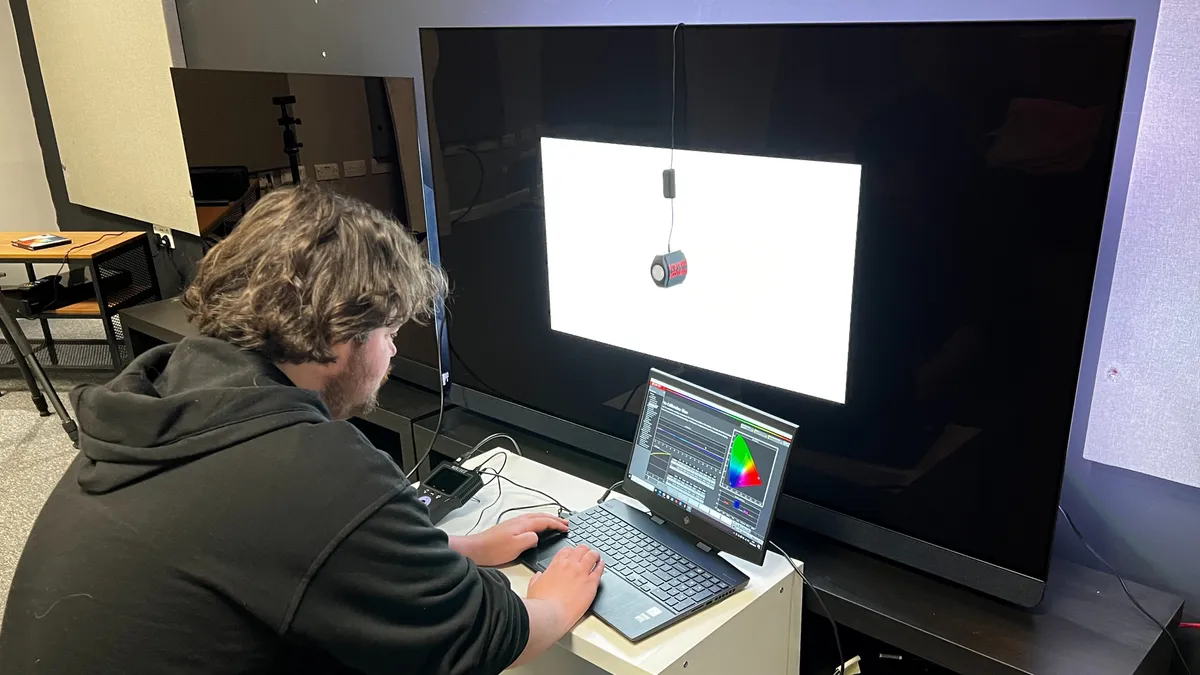
When we measure a TV's brightness, we focus on two key areas: peak and full-screen brightness. Brightness is measured in nits, and when we test brightness, we use white window patterns in sizes 1-100%, with peak being 10% and fullscreen being 100%. We also analyze brightness in both SDR and HDR.
Peak brightness will tell us how highlights will look on a screen, particularly in HDR. Think of the sun on a horizon or a torch in a dark scene - peak brightness will give us an idea of how these types of highlights will look on screen.
Full-screen brightness is important for telling us how a TV will retain and display brightness, and also how it will handle bright viewing conditions and how it can handle reflections. Mini-LED TVs tend to have the highest brightness and are best suited for brighter rooms.
Color gamut

A TV's color gamut refers to how wide a range of colors it can show, with the results when measured shown in a percentage. The higher a TV's color gamut coverage, the more colors it can show. When we measure color gamut coverage, we focus primarily on two color spaces: UHDA-P3 (also known as DCI-P3), which is used when mastering digital cinema releases and 4K Blu-ray, and BT.2020.
When we measure HDR color gamut coverage, we're looking for a result of over 95% in the UHDA-P3, while expecting 70-80% in the BT.2020 color space, although this number is increasing with more TVs hitting over 80% in recent years.
We've seen some milestone results in 2025 with color gamut coverage, with several OLEDs hitting 100% of UHDA-P3, while the Hisense 116-inch UX hit a remarkable 92% of the BT.2020 space, the highest we've recorded to date.
Picture accuracy

Another area we test is color and grayscale accuracy. To do so, we run through a cycle of test patterns and then take an average of the Delta-E (the margin for error between the test pattern source and what's shown on screen), hoping for a result lower than 3 (the number that's accurate enough that differences can't be discerned by the human eye).
To test color accuracy, the TV cycles through red, green, blue, yellow, magenta, and cyan patterns. For grayscale, 0-100 patterns are analyzed, with 0 being black and 100 being full white.
Input lag

Input lag refers to the time delay between a signal source being sent to a display and when that source shows on screen. Input lag is most important for gaming, with a shorter input lag resulting in better performance.
Input lag is measured in milliseconds (ms), and when we measure a TV's input lag, using a Leo Bodnar 4K HDMI Input Lag Tester, we make sure to put the TV into its Game mode, or activate its game settings, to deliver the best results. Ideally, we're hoping for below 15ms, as this is the threshold most gamers are looking for.
More 75-inch TVs we've tested
This is a listing of TVs we've reviewed that are available in a 75-inch size but didn't quite make the list above.
Latest updates to this 75-inch TV guide
October 12, 2026
Added 'How to choose' buying advice, and overhauled FAQs.
August 13, 2026
Replaced the LG G5 with the LG G6 as the best 75-inch premium OLED.
June 10, 2026
Updated page structure, refreshed intro, and ensured specs/prices are up to date.
November 7, 2025
Made an overhaul of this guide. Added in LG as 'best overall', TCL QM7K as 'best budget US', TCL C7K as 'best budget UK', Hisense U8QG as 'best mid-range', LG G5 as 'best premium OLED', and Samsung QN90F as 'best for bright rooms'. Updated other TVs to consider and how we test sections. Removed other TVs coming in 2025 section.
July 14, 2025
Replaced the Samsung 75QN90D with the Samsung 75QN90F as our 'Best for sports' pick, based on recent testing.
May 9, 2025
Added LG G5 OLED TV to guide as 'Best for wall-mounting' option.
March 11, 2025
Added in Quick list product grid with quick summaries for each entry on the list. Added gallery of images to each entry. Added more models to the 'Other 75-inch TVs we've tested' section.
