


✅ More than 100 monitors reviewed over the past few years
✅ 15 years of product testing
✅ Over 16,000 products reviewed in total
✅ Nearly 200,000 hours testing tech
Once you have one of the best ultrawide monitors on your desk, you'll understand the wide range of benefits these immersion-built powerhouses have to offer – quite literally. We at TechRadar have tested and reviewed the finest ultrawide displays on the market, and this guide will help you find the right one to fit your PC setup.
Ultrawide monitors are all about space. With their elevated 21:9 to 32:9 aspect ratios (compared to 16:9 on standard monitors), you get more screen real estate in just a single display. From working in multiple windows or apps at once to game-changing immersion in the latest PC titles, you'll essentially be getting a multi-monitor setup in one package. And the ultrawide monitors of today are a visual treat for the eyes.
Right now, the best ultrawide monitor we recommend is the Alienware AW3426DW thanks to its five-layer tandem OLED panel for crisper details and high brightness, along with its super-smooth 280Hx refresh rate. Plus, it's competitively priced! But if you're look for a wallet-friendly monitor that still offers decent colors and a fast refresh rate, the Alienware AW3425DWM is our go-to choice.
With over 20 years of testing hundreds of displays, my team of monitor experts has found just the ultrawide screens worth buying to upgrade your PC setup. In this guide, I've put together a list of the best ultrawide monitors to put on your radar.
The best ultrawide monitors you can buy right now
Why you can trust TechRadar We spend hours testing every product or service we review, so you can be sure you're buying the best. Find out more about how we test.
The best ultrawide monitor overall

The Alienware AW3426DW is our pick for the best overall ultrawide monitor, taking the win with its penta (five-layer) tandem OLED stack for absolutely incredible brightness in a 34-inch (3440 x 1440) display with a super-wide 1800R curvature. The latest in display tech for $799.99 / £709 / around AU$1,150? Now that's an ultrawide monitor anyone should consider.
With its 34-inch, 21:9 QD-OLED panel and crisp 1440p resolution, the AW3426DW offers a truly expansive workspace that feels like having two displays in one without actually have to take over your desk. We found the extra horizontal real estate perfect for keeping multiple windows side by side, and it never felt unwieldy or overwhelming on a standard desk. The pixel density is high enough that text remains sharp for all-day productivity, yet games and films fill your field of view with cinematic immersion.
Speaking of, gaming performance is where this Alienware flexes (as it should). The 280Hz refresh rate is incredibly high, and the 0.03ms GtG response time means fast action in shooters and racers stays blur-free and responsive. In our real-world use, everything from Destiny 2 to Dragon’s Dogma 2 felt buttery smooth, and the speed boost is noticeable even in everyday browsing and scrolling.
The only real hiccup we encountered was the occasional glitch when switching HDR modes, as on one occasion, our reviewer, Isaiah, had to restart the PC to recover the display. That’s a minor frustration, but one worth mentioning for buyers who plan to toggle HDR settings often.
All told, the Alienware AW3426DW is the rare ultrawide that nails the right size, resolution, and panel performance for both work and play with a great price to match. If you want a single monitor that’s as comfortable with spreadsheets as it is with hgih-stakes shooters and HDR streaming, this is the one to get.
Read our full Alienware AW3426DW review
The best budget ultrawide monitor

If you're shopping for a display that delivers immersive, expansive visuals without overwhelming your desk or wallet, this Alienware AW3425DWM stands out not just for its real-world value, but also for its sharp 3440 x 1440 resolution and an impressive 180Hz refresh rate – and that all comes in a satisfyingly compact, small-footprint package.
During our testing, which included everyday work and playing a wide range of games like Assassin’s Creed Shadows and Forza Motorsport, we found the nice 1500R curved screen design made immersion a treat, while its 1ms response time kept fast action feeling crisp and responsive. This is the kind of setup that rewards both competitive play and cinematic experiences, especially if your hardware isn’t top-of-the-line.
Even though its not an OLED panel, you'll still find rich, striking colors and blacks across the board. Yes, the AW3425DWM wins on price, but you’ll need to add your own speakers and connectivity setup for the complete PC setup, since it made some trade-offs to keep the price low.
It's not easy to find a curved, ultrawide monitor that's well below $500 / £500 / AU$1,000, but the Alienware AW3425DWM thankfully found its way to our desks to show us it can happen. And from using this screen as our main driver, if you're all about value, it should make its way to your desk, too.
Read our full Alienware AW3425DWM review
The best premium ultrawide monitor

The LG UltraGear Evo 39GX950B-B 5K2K OLED is the premium ultrawide monitor for buyers who want the most immersive, high-fidelity single-screen experience money can buy. Its massive 5K2K (5120x2160) resolution stretches across a 21:9 panel, giving you a screen that feels expansive for both creative work and cinematic gaming. You'll need a higher-end GPU to really show off what it can do, but it's worth its relatively high price.
As with many of the latest OLED ultrawides, what sets this Evo apart is its fourth-generation tandem OLED panel, which delivers deep blacks, rich colors and amazing brightness. That is exactly what you want for color-critical projects or games with jaw-dropping sequences. What's more, we didn't notice any ABL (Automatic Brightness Limiter) issues throughout our testing, and playing games like Horizon Forbidden West really showed off its HDR prowess with stunning scenery.
With its 5K resolution, you'll get a 165Hz refresh rate, which isn't the highest you'll find on an ultrawide monitor. However, reaching high refresh rates with demanding games and settings at this resolution is taxing, so you'll want a powerful GPU to really get those numbers up. Still, with its 1080p Dual Mode (2580 x 1080 resolution), refresh rate bumps up to 330Hz, and that's fantastic for competitive play and a smoother experience.
Another great feature worth noting is that desk integration is seamless thanks to 90W USB-C power delivery, which kept our laptop charged and cable clutter to a minimum. Even the built-in 7W speakers proved handy when jumping between PC and PS5 gaming.
If you demand outstanding image quality, HDR, and creative workspace from a single ultrawide screen, the LG UltraGear Evo 39GX950B-B is the flagship to beat. Just prepare your wallet for it.
Read our full LG UltraGear Evo 39GX950B-B review
The best super ultrawide monitor

Are you looking for the widest digital view possible? The Philips Evnia 49M2C8900 QD-OLED is the super ultrawide monitor that delivers a massive 32:9 aspect ratio and an impressively smooth 240Hz refresh rate, making it a dream pick for anyone chasing the most immersive single-panel desktop possible.
Essentially, it's like having two sizeable screens in one. Whether you're multitasking across windows or diving into cinematic game worlds, the Evnia's screen real estate and visual punch really do set it apart. But it doesn't sacrifice detail; with its QD-OLED panel, we found color vibrancy and contrast to be a clear highlight.
We also had plenty of fun in games that thrive on deep blacks and dynamic color, like Cronos: The New Dawn, where the OLED panel's strengths shine. However, all that space and speed mean you’ll need serious GPU power to keep up with it, so make sure you've got the performance chops.
This super ultrawide actually comes with a reasonable price tag that can be found below the $1,000 / £1,000 mark, making it quite the value buy for this kind of monitor and its premium specs.
Not everything is perfect: our experience with the Ambiglow RGB feature was a mixed bag, occasionally missing the mark on color accuracy. Still, if you want a bezel-free workspace for gaming or multitasking, the Philips Evnia 49M2C8900 is one of the best ways to go ultrawide without compromise.
Read our full Philips Evnia 49M2C8900 QD-OLED review
The best bendable ultrawide display

Bendable monitors aren't anything new in the PC world anymore, but the Corsair Xeneon Flex 45WQHD240 OLED is one of the pioneers. As with any unique tech, it's an expensive piece of kit, but it gives you a whole new experience you won't get from all other ultrawide gaming displays – and gaming monitors in general, for that matter.
By bendable, we really do mean bendable, as this display's panel is capable of curving up to 800R. That means that you can pretty much play whatever PC game genre you want on this monitor at the ideal curve for immersion. And it can completely flatten as well for games like Rocket League and Sid Meier's Civilization VI. Its flex is quite literally its flex.
Being an OLED panel, we weren't surprised to also find its colors rich and its blacks beautifully deep. What we were particularly pleased about were the color representation and color accuracy. Our colorimeter reading gave us just under 100% DCI-P3, 100% sRGB, and a Delta E average of less than 1. That means that it’s good enough for content creation as well.
There are opportunities for improvement here. The bending mechanism still feels clunky, HDR10 support is also disappointing, and there are no swivel or height adjustments. However, this is a truly versatile and immersive gaming monitor that's worth considering if you want to go the ultrawide route.
Read our full Corsair Xeneon Flex 45WQHD240 review
The best ultrawide monitor for work
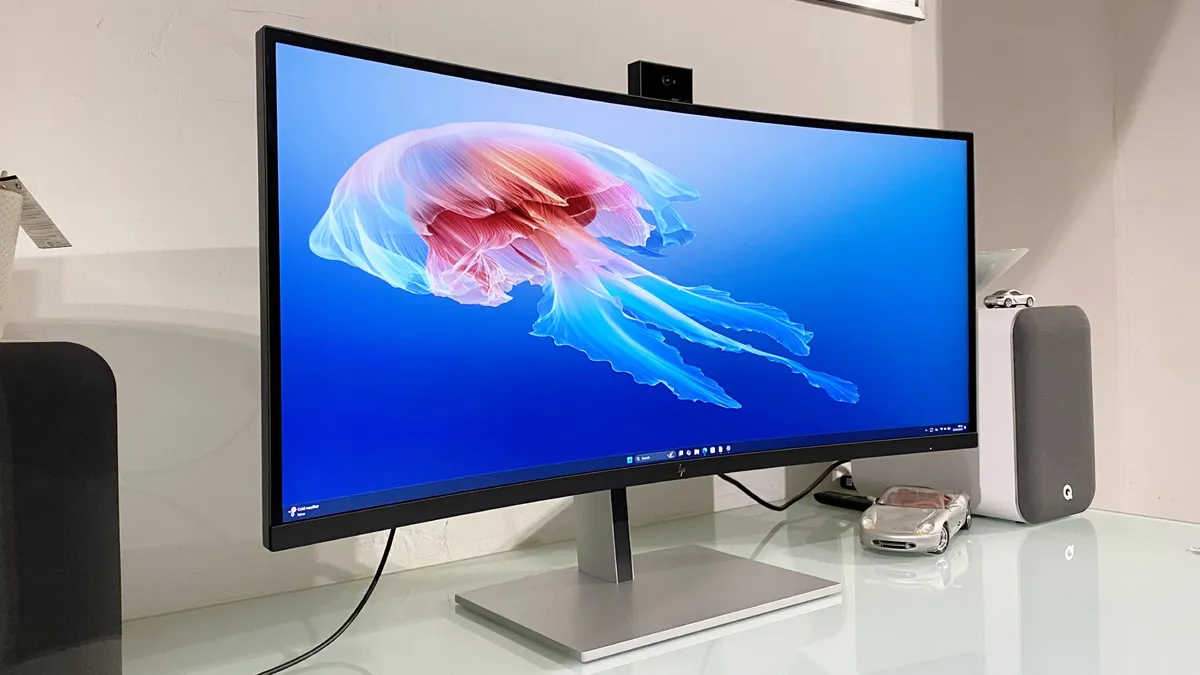
Who says ultrawide monitors are just for gaming? The HP Series 7 Pro 734pm widescreen monitor is purpose-built for productivity, with its outstanding array of connectivity and a webcam that actually outperforms most built-in laptop cameras.
If you’re tired of juggling multiple cables or relying on grainy conference calls, we found this monitor’s docking-friendly ports and sharp 5MP AI camera make it a genuine upgrade for work-from-anywhere setups.
At 34 inches with a 3440 x 1440 resolution, the HP gives you that crucial ultrawide workspace for multitasking. Think full-size spreadsheets, side-by-side documents, or sprawling timelines. The 98% DCI-P3 color coverage means colors are faithful and accurate, which is especially helpful if your day includes creative or content work.
The biggest letdown? Speaker quality. In our experience, the integrated speakers pump out plenty of volume but sound thin and unimpressive—not ideal for video calls or background music. Still, if your priority is a streamlined, productive workspace and webcam performance, this is the ultrawide to beat.
Read our full HP Series 7 Pro 734pm review
The best OLED ultrawide monitor

The Alienware AW3926QW is the OLED ultrawide we’ve been waiting for, pairing LG’s latest tandem WOLED panel with a sprawling 39-inch canvas that simply dominates your desk. The use of RGB-stripe subpixels means text and fine details look crisp, making this screen equally at home with games, creative work, and, really, whatever you throw at it.
In terms of pure picture quality, the AW3926QW delivers exactly what you want from an OLED flagship: astonishing contrast, true blacks, and vibrant color that leaps off the panel. With peak HDR brightness at 1300 nits, highlights in games and movies look punchy, while full-screen brightness (up to 300 nits) does a fine job. While it could be brighter, you're still getting cinematic, HDR pop that only OLED can deliver at this scale.
After gaming across Steam, deep photo edits, and hours of movie watching, oour reviewer, Jeremy, noted that it may just be the best gaming monitor he's tested, which says a lot. The ultrawide 21:9 format and generous screen size created a workspace roomy enough for heavy multitasking, while the OLED’s color fidelity brought both games and visuals to deliver stunning results. Plus, with its gentle 1500R panel curvature, you're getting a wide-spanning panel and great immersive visauls.
The main catch? We spotted some edge dimming (or vignette dimming) during dark scenes, which, while not a dealbreaker, can be a bit of a distraction. Still, if you’re chasing best-in-class OLED immersion, sharp ultrawide visuals, and all you could want in a monitor, the Alienware AW3926QW is our top OLED pick.
Read our full Alienware AW3926QW review
Also tested
The Best Ultrawide Monitors: FAQs

What’s the difference between ultrawide monitors and standard monitors?
The difference between ultrawide monitors and regular monitors mainly lies in their aspect ratios. Standard monitors have an aspect ratio of 16:9, whereas ultrawide monitors have an aspect ratio of 21:9, making them, as their name states, much longer horizontally. The extra length is great if you need to keep a lot of things onscreen or just like watching or creating 4K videos.
It’s important to note that, as impressive as ultrawide displays are, their resolutions aren’t always supported by modern tech. If you’re looking for a monitor to connect to your PS5 or Xbox Series X, you’re probably better off with a standard monitor because the traditional resolutions are supported on those consoles. That's why the best gaming PCs, or even the best laptops, will be a better fit.
Is an ultrawide monitor good for gaming?
Yes, ultrawide monitors are a popular choice among gamers due to the extra real estate that they provide. With an ultrawide display, you can typically see more of your in-game surroundings than you can with a more standard 16:9 display.
Additionally, many ultrawide monitors feature curved screens, which are ideal for drawing you into your game, and offer you a deeper level of immersion than a flat panel display can provide.
Is an ultrawide monitor worth it?
There’s no doubt that an ultrawide monitor will set you back more than a regular one will (unless you go for the Alienware AW3425DWM). Whether or not it’s worth the extra cost will depend on you, but do know you're basically getting two screens for one.
Ultrawide monitors, particularly curved ones, can be game-changing for creativity and PC gaming. And if you're looking for a more immersive experience with either, it’s well worth making the upgrade. They’re also good for productivity, too, since they allow more scope for multitasking.
Ultrawide monitors tend to have a slightly lower resolution than other monitor options, so it’s worth bearing this in mind. And if you’re looking for more vertical space from your monitor, you may prefer to look at other alternatives.
How big of an ultrawide monitor should I get?
For a long time, 34 inches was the largest screen size you could get for an ultrawide monitor, but there are now plenty of screens that are much larger these days. If you've got the space on your desk (and in your chosen room), going for a wider display can boost your productivity and, yes, especially gaming.
For example, the MSI MPG 491CQP QD-OLED, Samsung Odyssey OLED G9 and Philips Envia 49M2C8900 QD-OLED are massive 49 inches with resolutions of 4K and 1440p. These are completely immersive experiences, but they require a lot of room. Sometimes, it can even be too much screen for many, though.
If you're looking for that sweet spot, the LG UltraGear GX9 comes in at 44.5 inches, so while it's still big, it's not going to completely take over a space.
How we test ultrawide monitors

Testing monitors in general is more involved than you'd think. It isn't as simple and straightforward as setting it up, using it for a day, and taking down notes. A monitor is an investment, whether you're looking to get the traditional 16:9 aspect ratio or need the screen real estate an ultrawide monitor can offer, so we take great pains to ensure that anything we recommend is worth your hard-earned money.
To do so, we use it as our main monitor for at least a week, utilizing it for our day-to-day workloads, watching movies and shows with it, and playing our favorite AAA games on it if it's a gaming monitor. This way, we can gauge its real-world performance.
We also test very specific things like refresh rates, response times, and viewing angles. We use a colorimeter to check its color reproduction, color accuracy, and uniformity. We check to see just how smooth, clean, and artifact-free its image quality is as well as how good its marquee features like HDR, adaptive sync technology, RGB lighting, and curvature are.
Of course, we note its design, aesthetic, and other physical features like how thin its bezels are, how good its port selection is, and how durable its build is. We then gather all that information and compare it to its price tag, to see if it’s a great value to consumers.
Today's best ultrawide monitor deals
