





TechRadar Verdict
The A5 2027 Edition trades some raw performance for a cooler, quieter machine built for long shifts rather than short bursts. Whether that trade is worth it for most buyers depends on benchmark results still to come from hands-on testing.
Reasons to buy
- +
Good value office machine
- +
Genuinely quiet, low-heat operation
- +
Same easy internal access as the original A5
- +
Triple storage expansion, including SATA
Reasons to avoid
- -
Lower sustained clocks than the outgoing A5 2025 Edition
- -
Still no USB4 or Thunderbolt
- -
Noticeably pricier than the original A5 at launch
Why you can trust TechRadar We spend hours testing every product or service we review, so you can be sure you're buying the best. Find out more about how we test.
Geekom A5 2027 Edition: 30-second review
Often, reviewing computer equipment has an odd, unexpected cyclical nature. Because many companies can’t be bothered with new nomenclature and launch new products with old names.
This is at least the third version of the Geekom A5 I’ve seen, and thankfully Geekom have decided to call this the 2027 Edition to segment it slightly from prior options.
Where the original Geekom A5 went after desktop-class performance on a budget, the 2027 Edition changes tack. Geekom has kept the same compact metal chassis, the same generous port selection and the same easy access to internals, but it has fitted a very different processor under the hood.
Out goes the AMD Ryzen 7 5800H, a 45-watt mobile chip that pushed hard for performance. In comes the AMD Ryzen 7 7730U, a 15-watt part that shares the same Cezanne silicon and Zen 3 cores but is tuned for efficiency rather than speed.
The result, on paper at least, is a machine that runs cooler and quieter, backed by a new IceBlast 3.0 cooling system that Geekom claims cuts noise to as low as 28dB at idle. Geekom is now pitching the A5 2027 Edition for 24/7 office and commercial use, rather than as a budget performance desktop.
The available SKUs offer two CPU options: a cheaper AMD Ryzen 5 7430U and a more powerful AMD Ryzen 7 7730U. All machines come with 16GB of DDR4 memory, but storage can be 256GB, 512GB or 1TB.
Memory is expandable to 64GB, and storage has actually grown more flexible, with room for two NVMe SSDs and a 2.5-inch SATA drive, but the second M.2 slot is the smaller 2242 variety.
What the A5 2027 Edition offers is a relatively affordable platform for general office use, but it lacks the expansion possibilities that the best mini PCs provide with technology like OCuLink, USB4 and Thunderbolt.

Geekom A5 2027 Edition: Price and availability
- How much does it cost? From $465/£446/€479
- When is it out? Available now
- Where can you get it? Currently, this machine can be obtained directly from Geekom or via online retailers
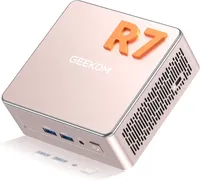
The A5 2027 Edition is sold in several bundles, and the number of SKUs varies by region. Most come with 16GB of RAM, but with different processors and storage.
The variations are complicated, so I’ve created a small table showing the options and prices for the US, UK and EU. Each region also has a discount code that improves prices by 10% in the US, 5% in the UK, and €50 off in the EU.
CPU |
RAM/SSD |
USA price |
UK price |
EU price |
|---|---|---|---|---|
Ryzen 5 7430U |
16GB+1TB |
$465 |
£449 |
€479 |
Ryzen 7 5825U |
16GB+512GB |
$499 |
N/A |
N/A |
Ryzen 7 7730U |
16GB+256 |
$499 |
£399 |
€479 |
Ryzen 7 7730U |
16GB+512GB |
$549 |
£469 |
€549 |
Ryzen 7 5800H |
32GB+512GB |
N/A |
N/A |
€549 |
As you can see in the table, only three SKUs are available in all locations, and some 5800 series options are unique to the US and parts of the EU.
What needs to be acknowledged is that the prices of RAM and storage have skyrocketed in the past year, and given those increases, the price of this A5 doesn’t seem excessive. Though, considering that the memory and storage on these machines are replaceable, it seems odd that Geekom didn’t offer a barebones SKU.
It should be noted that the AMD Ryzen 7 5800H model was on the German and Spanish Geekom sites, but not on their French or Italian. Canada has the same SKUs as the USA, and Japan has the same, but with the Ryzen 5 7430U model removed. The older A5 had the 5800H, so these machines may not be the 2027 Edition, but older stock.
Curiously, via Amazon you can buy the AMD Ryzen 7 7730U 16GB+512GB for the same price as Geekom offers it (before the discount code), $549 or £469, but it comes in Rose Gold, not silver.
The two obvious competitor machines that use the same platform are the GMKtec NucBox M5 Ultra and BOSGAME P4 Ultra.
The GMKtec NucBox M5 Ultra can be found on Amazon for $599.99 or £609.96, but it comes with 32GB+1TB and the 7730U processor. A better value option is the BOSGAME P4 Ultra, which you can get on Amazon.co.uk with a voucher for £385, and it comes with 16GB+1TB and a Ryzen 7 CPU. The same machine is $519 on Amazon.com.
Therefore, if you want this platform cheaper, then BOSGAME is probably the right choice, but the GMKtec machines look better made, and the P4 Ultra can come with a single memory module, undermining its performance significantly.
- Value: 4 / 5

Geekom A5 2027 Edition: Specs
CPU: |
AMD Ryzen 7 7730U (8 cores, 16 threads, 16MB cache, 2.0GHz to 4.5GHz) |
GPU: |
AMD Radeon Vega 8 Graphics (integrated) |
RAM: |
16GB DDR4 SODIMM (dual-channel 2x8GB, expandable to 64GB) |
Storage: |
512GB M.2 2280 PCIe 3.0 x4 NVMe SSD, plus free 2.5" SATA bay and M.2 2242 SATA slot |
Ports: |
3x USB 3.2 Gen 2 Type-A, 2x USB 3.2 Gen 2 Type-C, 1x USB 2.0 Type-A, 2x HDMI 2.0, 1x 3.5mm audio jack, SD card reader |
Networking: |
2.5GbE LAN, Wi-Fi 6, Bluetooth 5.2 |
OS: |
Windows 11 Pro (pre-installed) |
Base Power: |
15W (TDP) |
PSU: |
19V 3.42A, 65W |
Weight: |
652g |
Dimensions: |
117mm x 112mm x 49.2mm |
Geekom A5 2027 Edition: Design
- Same enclosure again
- Easy access retained
- No USB4
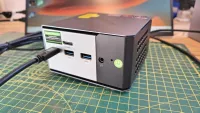
Visually, the A5 2027 Edition is business as usual for Geekom. It reuses the same silver metal-and-plastic chassis as the original A5 and the Mini IT13 before it, with two USB ports and the audio jack on the front, the SD card reader on the left, and the rest of the I/O around the back.
One aspect of this design I especially liked is that all the ports are labelled correctly, revealing the USB specification and whether the port is designed for charging. Some makers just completely ignore these details, leaving ports alongside others with a completely different specification looking identical.
Internal access follows the same familiar pattern too. Four retained screws release the base, which stays tethered by a ribbon cable feeding the free 2.5-inch SATA bay underneath. The DDR4 SODIMM slots and the primary M.2 2280 NVMe slot sit inside, alongside a second, smaller M.2 2242 slot for a SATA SSD.
I wish the second slot was 2280-sized, but evidently there was insufficient space for it.
That gives the A5 2027 Edition a genuinely unusual triple-storage layout for a machine this size, and Geekom quotes a combined ceiling of around 7TB across all three. Not sure how that works, because the 2280 slot could take 4TB, I’ve seen 2TB on 2246, but SATA HDDs can be at least 5TB and SSDs to at least 4TB. Therefore, you could put more than 7TB in one of these machines.
What’s good about this system is that the internal access doesn’t require removing adhesive-attached feet, and the memory is socketed, allowing for easy upgrades.

The only caveat with the memory, other than the lower bandwidth of DDR4 compared to DDR5, is that to get the best performance, the memory upgrades need to be in pairs.
So if you want more memory, sticking one 16GB stick alongside an existing 8GB module isn’t ideal. It might work, but it will reduce the memory mode to single-channel. Therefore, if you want more RAM, two 16GB or 32GB SODIMMs are the path to follow, leaving you two 8GB modules to re-home.
There are 48GB DDR4 modules available, but the maximum RAM on this platform is 64GB. At the time of writing, a 32GB DDR4 SODIMM is typically around $250, making that upgrade about the same cost as the system. But should the AI bubble burst (or rather, when), then that might be a more realistic proposition.
My disappointment is that there is no USB faster than USB 3.2 Gen 2, even though the platform has plenty of unused PCIe lanes. There are at least five USB ports with this specification plus a single USB 2.0, but not a single USB4 or USB 3.2 Gen 2x2 port. I understand the resistance to putting USB4 controllers on older platform technology, but the market has outgrown USB 3.2 already.
Overall, as I’ve come to expect from Geekom, this is a well-made mini-PC which delivers a decent user experience for those who aren’t excessively ambitious from a performance perspective. It isn’t a massive evolution from earlier, but it seems decent value for money in these difficult times.
- Design: 4 / 5
Geekom A5 2027 Edition: Features
- AMD Ryzen 7 7730U
- New Barcelo-R silicon with a lower power ceiling
- IceBlast 3.0 cooling
The headline change in the A5 2027 Edition is its processor. The AMD Ryzen 7 7730U carries a similar die and Zen 3 cores as the 5800H in the original A5, with the same 8 cores, 16 threads and 16MB of L3 cache. Where the 5800H was a Cezanne design, the 7730U is one of four Barcelo-R chips that AMD made before moving on to the Rembrandt-R architecture.
The biggest change between these chips is the power envelope, cut from 45 watts to 15 watts.
That is a significant reduction, and it shows up directly in sustained clock speed. Our CPU-Z capture shows the new chip running at 3470.7MHz under its default profile, down from the 4364.5MHz we saw on the outgoing 5800H with the same tool.
The smaller 65W power brick that ships with the 2027 Edition, down from the original's 120W unit, reflects how much less power headroom this design now needs. Geekom backs the lower TDP with its IceBlast 3.0 cooling system, said to improve cooling efficiency by around 42 per cent over the previous generation and to keep core temperatures under 72 degrees Celsius after an hour of sustained heavy load in a 30-degree room.
Geekom quotes noise levels as low as 28dB at idle and around 32dB under heavy load, figures that make the A5 2027 Edition a genuinely quiet machine for a desk or reception area.
The trade made here is performance for silence, which, depending on the working environment, could be the right or wrong choice.
Storage and memory remain DDR4 rather than the faster DDR5 found in newer Ryzen designs, and the M.2 slot is still limited to PCIe 3.0, so NVMe throughput is capped in the same way it was on the original A5. Port-wise, the story is also unchanged: still no USB4 or Thunderbolt, with USB 3.2 Gen 2 Type-A and Type-C as the fastest connections on offer.
That this system comes with dual HDMI 2.0 outputs and an easily accessible SD card slot on the side offers genuine potential for marketing displays, especially considering how cool it all runs.

What needs to be said is that this isn’t especially new technology. The processor was first launched in Q1 of 2023, which will shortly make it four years old. Fabricated on the older TSMC 7nm FinFET technology, it can’t hope to offer the same levels of efficiency as the latest Ryzen parts, which use TSMC N4P FinFET.
To be clear, there is little wrong with the older chips, and AMD evidently still holds a significant stock of them, but better, more efficient technology is available for those willing to invest in it.
These devices offer significant performance increases in CPU-, GPU-, and NPU-related tasks, have better technologies (USB4, etc.) and larger caches.
But they don’t have upgradable memory, as they use LPDDR5X-8533 surface-mounted memory, or similar, and their default power consumption is greater, leading to fan noise.
The computing platform in the A5 2027 Edition might not be full of youthful enthusiasm, but it's more than adequate for many office tasks.
- Features: 3.5 / 5
Geekom A5 2027 Edition: Performance

Mini PC |
Row 0 - Cell 1 | Geekom A5 2027 Edition |
Geekom A5 |
CPU |
Row 1 - Cell 1 | AMD Ryzen 7 7730U |
AMD Ryzen 5 7430U |
Cores/Threads |
Row 2 - Cell 1 | 8C 16T |
6C 12T |
RAM |
Row 3 - Cell 1 | 16GB DDR4 (2x8GB) |
16GB DDR4 (2x8GB) |
SSD |
Row 4 - Cell 1 | 512GB SSD |
512GB SSD |
Graphics |
Row 5 - Cell 1 | Radeon Vega 8 |
Radeon Vega 7 |
3DMark |
WildLife |
7346 |
6796 |
| Row 7 - Cell 0 | FireStrike |
3504 |
3259 |
| Row 8 - Cell 0 | TimeSpy |
1390 |
1288 |
| Row 9 - Cell 0 | S.Nomad |
1111 |
1086 |
Cine24 |
Single |
86 |
71 |
| Row 11 - Cell 0 | Multi |
479 |
421 |
| Row 12 - Cell 0 | Ratio |
5.58 |
5.96 |
GeekBench 6 |
Single |
1993 |
1910 |
| Row 14 - Cell 0 | Multi |
7712 |
6503 |
| Row 15 - Cell 0 | OpenCL |
16050 |
14325 |
| Row 16 - Cell 0 | Vulkan |
14539 |
13895 |
CrystalDisk |
Read MB/s |
3736 |
3208 |
| Row 18 - Cell 0 | Write MB/s |
3186 |
2290 |
PCMark 10 |
Office |
6709 |
5296 |
WEI |
Score |
8.1 |
8.1 |
It was originally my intention to compare this A5 with the 5800U-powered one, but when I looked at the data, that prior model came during a transition where I was switching from Cinebench 23 to GeekBench 5. And I no longer have that hardware to retest.
What I can say is that in the data I do have that maps between the two, the 5800U was more powerful, but it used more power and fan noise was audible.
What I did find in my data pile was an older A5 that used the AMD Ryzen 5 7430U CPU, and those benchmarks mapped to what I used on the A5 2027 Edition and provided some interesting context between the two.
It’s not exactly a revelation that a CPU with more cores and a better GPU is going to run faster, but that’s the narrative running through these results. But it also hints in the Windows Experience Index that for a person running Office applications on these systems, the difference might not be significant, or even noticeable.
In this respect, the A5 2027 Edition is a punchier option, but it's hardly leaving the older A5 with the Ryzen 5 platform in the dust. For those wanting to minimise the cost of these systems, there might be something useful to take from these results for them.
As an aside, I recently reviewed the BOSGAME P4 Ultra, which uses the same CPU as the A5 2027 Edition but performs worse than the old A5 with the Ryzen 5 CPU. How is that possible? It is when you deliver the 16GB of RAM in a single module, reducing the bandwidth of the system by 50%. As an example of the impact of doing this, the WildLife score on the P4 Ultra is only 4961.
The lesson from these scores is never run one of these systems in single-channel mode, unless you like your computers to run slowly for no good reason.
- Performance: 3.5 / 5
Geekom A5 2027 Edition: Final verdict

I would consider the Geekom A5 2027 Edition as a refresh rather than a generational leap. Geekom has kept everything that made the original A5 easy to recommend: the compact metal chassis, the simple internal access and the strong port selection, and layered on a genuinely useful third SATA storage option.
What it has not done is make the machine dramatically faster. The move from a 45-watt to a 15-watt processor trades outright performance for lower noise, lower heat and, Geekom claims, lower running costs over years of continuous use.
For buyers who want a quiet, always-on machine for general office work, that trade could be exactly right. For anyone chasing the best possible performance per pound, the original A5, while now harder to find new, made a stronger case.
Should you buy a Geekom A5 2027 Edition?
Value |
Pricier than the original A5 at launch, but that's to be expected. |
4 / 5 |
Design |
An effective design that doesn't need to change |
4 / 5 |
Features |
Four-year old tech, but still useful |
3.5 / 5 |
Performance |
Slower than the 5800U A5s, but not terrible |
3.5 / 5 |
Overall |
A quieter, cooler machine aimed at 24/7 office duty rather than raw speed. |
4 / 5 |
Buy it if...
Don't buy it if...
Also Consider
For more professional hardware, we've reviewed the best business computers.
