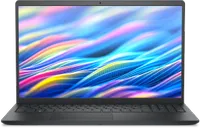
If you need a capable, no-fuss 15-inch laptop for work, study, or everyday use, the Dell Inspiron 15 3530 is $729 (was $1100) at Best Buy. This configuration pairs the 13th-generation Intel Core i7-1355U with 16GB of DDR4 RAM, a 512GB PCIe SSD, and a 15.6” FHD touchscreen in a slim Carbon Black chassis that weighs just 3.66 lbs — light for a 15-inch machine.
Dell’s Inspiron 15 range has long been a reliable pick for buyers who want mainstream performance without paying premium laptop prices, and the 3530 continues that tradition.
The i7-1355U is a solid productivity chip that handles everyday office workloads, web browsing, video calls, and light content creation comfortably, and the 16GB RAM baseline means it won’t feel cramped running multiple applications or browser tabs simultaneously.
Today's top Dell laptop deal
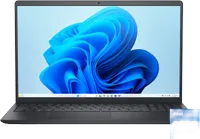
The Core i7-1355U is a 10-core, 12-thread chip built on Intel’s 13th-generation Raptor Lake architecture, with a boost clock up to 5.0GHz and 12MB of Intel Smart Cache. It’s a U-series processor, meaning it prioritizes efficiency over raw sustained performance — which translates to manageable thermals and reasonable battery life in a thin chassis. For the workloads this laptop is designed for — office productivity, research, streaming, light photo editing — it handles everything without complaint.
Intel Iris Xe Graphics handles the display and any light GPU tasks. It’s not a gaming GPU, but it’s more capable than previous-generation integrated graphics for tasks like video playback, basic photo and video editing, and occasional casual games. If you need dedicated graphics, you’ll want to look at a different machine, but for the everyday use cases this Inspiron targets, Iris Xe is more than adequate.
The 15.6” FHD touchscreen is an anti-glare WVA panel, which gives it wide viewing angles — useful for presenting work to others or viewing content at an angle. The touchscreen adds practical versatility for annotating documents, navigating in tablet-style use, or simply scrolling without reaching for the trackpad. The narrow-border design keeps the overall footprint compact for a 15-inch machine.
At 3.66 lbs and 0.75 inches thin, the Inspiron 15 3530 is noticeably lighter than many 15-inch competitors. It’s a machine you can carry between a desk and a meeting room, or pack into a backpack for a commute, without it feeling like a burden. The Carbon Black finish is understated and professional.
Connectivity covers the essentials well: Wi-Fi 6 for fast wireless, one USB-C (3.2 Gen 1) alongside three USB-A ports, HDMI 1.4 for an external display, a full-size SD card slot for photographers or content creators, and a combo headphone/microphone jack. The 1080p webcam is a welcome upgrade from the lower-resolution cameras common in budget laptops, making it noticeably better for video calls.
The 512GB PCIe NVMe SSD is fast and roomy enough for most users — operating system, applications, and a healthy library of documents and media. The RAM is DDR4 and sits in user-accessible SO-DIMM slots, and the storage is upgradeable, so there’s a clear path to expanding both if your needs grow.
The 41Wh battery is the honest caveat here. It’s a 3-cell pack, which is on the smaller side for a 15-inch machine, so heavy users will want to keep the charger handy for all-day sessions. For lighter workloads — documents, email, video calls — runtime is more reasonable, but it’s not a machine for long stretches away from a plug without some management.
For buyers who want a dependable, lightweight 15-inch Windows laptop with solid CPU performance, a touchscreen, and room to upgrade - without paying mid-range laptop prices - the Dell Inspiron 15 3530 makes a compelling case. You can also check out more options in our guide to the best business laptops.
Also consider: More Dell laptop deals