





- New version of Siri Remote appears in latest Apple code
- There are no details of how it might differ from the current one
- One popular wish, customizable buttons, is already possible
Apple's latest product leaks include good news for Apple TV owners like me: a new Siri remote is coming. The current one is rather divisive, with some people comparing it to the Magic Mouse as an example of Apple style over substance; I definitely think the current one is perhaps a little too sharp-edged and minimalist, and hitting the on-screen Skip button with it is often more miss than hit.
The leak was spotted by MacRumors in the code of the macOS 26.7 release candidate, which is the last version of code given to developers and beta testers before the final and official release. In the code there's a reference to 'ATVRemote1,5', which appears to be the same new remote control that Bloomberg's Mark Gurman previously described as part of Apple's 2026 product road map.
There are no details of what this new remote might do, but Redditors have plenty of good ideas — and three in particular would be on a lot of my fellow Apple TV owners' wishlists.
The features we'd like to see in the new Apple TV remote
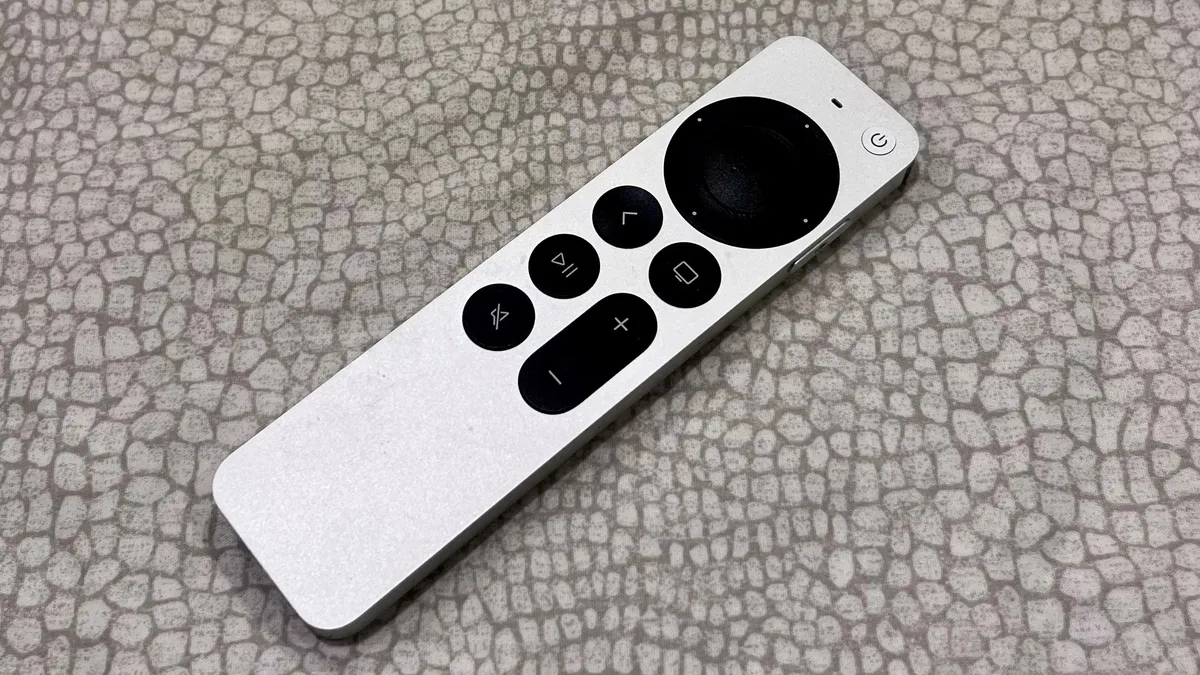
Over on r/apple, the very first suggestion is the one that's top of my wishlist too: a dedicated Source button.
Like Redditor Masam10, who like me has their Apple TV 4K connected to a Samsung TV, "A source button would mean I could officially drop my Samsung remote and throw it away. 9/10 times my Apple TV works just fine with HDMI CEC, but every now and then it will get a bit funky and not work and I have to use the Samsung remote to swap inputs," they explain.
The second suggestion, by the fantastically named 'handtoglandwombat', is a speaker for Apple's Find My feature. That'd be very welcome too, given the current Apple TV remote has a habit of disappearing down any available nook in your sofa. Some even have their remote in a case that holds an AirTag for this very reason.
Lastly, another interesting suggestion is the addition of a customizable action button — and the discussion of that unearthed an Apple tip I didn't know about, even though it's been there for a few years: you don't need to wait for a new remote to customize your buttons.
You can sacrifice one of your remote buttons, such as the Mute button, by changing what it does in Settings > Remotes and Devices > Volume Control > Learn New Device. Follow the instructions and when you get to the bit where it says press and hold the mute button, don't. Press the source/input button on your TV remote instead.
The downside, of course, is that you no longer have a mute button. But you might think that's a price worth paying to have a source/input button instead.
The next generation Apple TV is expected to arrive this Fall alongside a new HomePod mini, so we shouldn't have too long to wait for the new Siri remote — although whether it has all of these features remains to be seen.
Thinking of buying a new TV?
Try our TV size and model finder! You tell it how far you sit from your TV, we'll tell you what size to buy based on viewing angle advice from image quality experts, and we'll recommend our three top TVs at that size for different prices.

Follow TechRadar on Google News and add us as a preferred source to get our expert news, reviews, and opinion in your feeds.
